GTA 6 Too Dark? The HDR Fix That Actually Works
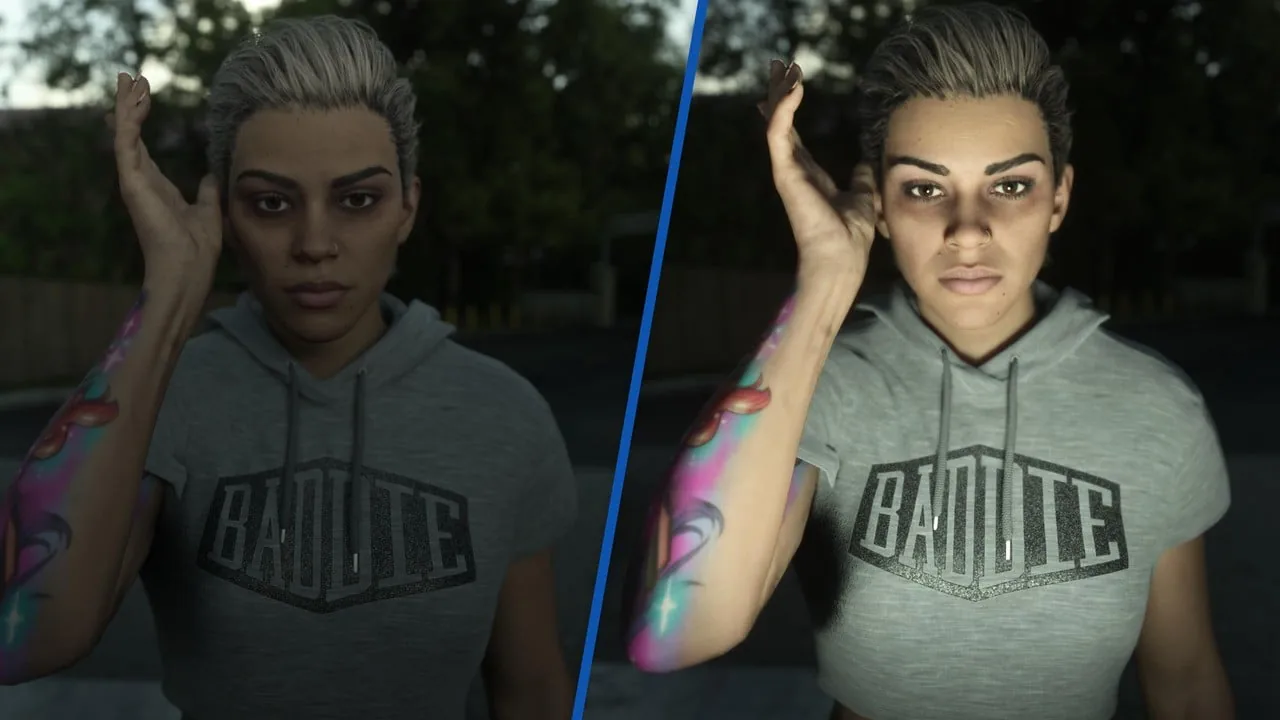
If GTA 6 looks too dark, the cause is the game, not your television: an HDTV Test analysis published on 20 November 2026, relayed by Push Square, Tech Times and Wccftech, found that GTA 6 ignores the HDR calibration stored on PS5 and Xbox, and that its sliders behave unpredictably.
There is a good chance the problem is not your television. One day after launch, on 20 November 2026, Push Square relayed a measurement session by Vincent Teoh of HDTV Test showing two things: GTA 6 ignores the HDR calibration stored on the console, and the values entered in the game's own calibration screen do not come out the way the menu promises. Tech Times and Wccftech reported the same findings the same day. The repair happens inside the game.
Your console calibration does nothing here
The PS5's Adjust HDR screen is worth doing for other games and wasted here: Push Square states plainly that the game ignores Sony's global HDR settings, so a perfectly calibrated console does not rescue the image. Tech Times reported that Teoh found the same behaviour on Xbox, where the console-side equivalent is Calibrate HDR for games under TV and display options.
Teoh measured on a calibrated reference monitor rather than a living-room set. Rockstar had issued no public comment as of 20 November, per Tech Times, and no patch had addressed it.
The three sliders, and what each one really moves
The screen is reached from the pause menu: Options, then Settings, then the Display tab, then HDR Calibration. Three sliders sit beside a test image — Max Brightness, Black Levels and Paper White — and the defaults, per the allthings.how walkthrough, are 600, 50 and 50.
The useful part is knowing which slider owns which symptom, which Leonida Intel's settings guide, last updated on 21 November 2026, sets out clearly. If shadows collapse into one black patch and the road disappears, the slider to move is Black Levels, raised until shapes reappear and backed off the moment blacks turn grey. If headlights, neon and wet-road reflections turn into white blobs with no detail left, the culprit is Max Brightness. If ordinary white surfaces look either dull or tiring across an evening, that is Paper White, which sets how bright a plain white wall should read in your room. The instinct to push Max Brightness whenever the picture is dark is wrong for half those cases: a frame that is murky in the shadows and fine in the highlights is a Black Levels problem, and raising brightness there only blows out the sky.
The 40% gap that explains the darkness
Teoh's most quoted measurement is also the one that explains the complaint. With Max Brightness set to 1,000 — a figure any owner of a 1,000-nit television would read as "my panel" — the sun in the night boat scene measured about 600 nits on the reference display, according to Leonida Intel's summary of the analysis.
Two conclusions follow. First, the slider's numbers are not nits. Second, and this is our arithmetic rather than Teoh's wording: the game undershoots by roughly 40%, so the ratio between the number to enter and the panel's real peak is about two to one. A 1,000-nit screen asks for 2,000. A 600-nit screen, by the same ratio, lands near 1,200 rather than 600.
That is where the widely shared starting set comes from: Max Brightness 2,000, Black Levels 20, Paper White 35 for a display capable of 1,000 nits or more, as published by Push Square and repeated by Tech Times and Wccftech. It is an analyst's starting point, not a Rockstar recommendation, and every guide cited warns that the numbers depend on the panel and the room.
Step by step, in the right order
Open HDR Calibration from the Display tab and leave the HDR row set to On, otherwise the sliders are unavailable. Skip the first test image: it shows the Rockstar logo with the instruction to adjust until the logo is barely visible, and Teoh's advice, relayed by Push Square, is to disregard that step entirely. It is the test inherited from earlier Rockstar releases, where one slider and one black reference were enough; it cannot carry three HDR parameters.
Press R1 to reach the second and third images, both of them the boat party, one in daylight and one at night. Judge reflections on the water and detail in the brightest parts of the sky there. Triangle hides the sliders so the whole frame can be read without the menu covering a corner, and Square restores the highlighted slider when you lose track of where it started, per allthings.how.
Work one slider at a time: Max Brightness first, using the two-to-one ratio as the starting figure, then Black Levels against the night image, then Paper White last, at your normal viewing distance. Confirm with Cross, then walk to a night street you already know and check that kerbs, road markings and shop signs stay readable. If they do not, reopen the screen rather than pushing a second slider blind.
The settings outside the calibration screen
Two adjustments still pay off after the HDR work. The television's game mode, first: Digital Foundry measured roughly 180 milliseconds of end-to-end latency in GTA 6 on Series X, and part of that budget belongs to display processing that game mode removes. Motion interpolation off, sharpness at zero, dynamic contrast and ambient-light sensors disabled: all three second-guess the calibration set two menus away.
When HDR is not worth the trouble
On a panel without local dimming whose peak brightness sits in the low hundreds of nits, SDR at a correct brightness often looks cleaner than a tone-mapped HDR image, and Leonida Intel's guide concedes that the defaults may be the best such a screen can do.
A correction to our own advice
In our settings guide published earlier today we wrote that HDR should be calibrated at system level. For GTA 6 that is wrong, and it is corrected there: the console calibration serves every other game and does nothing for this one.